Rise Of The Dead Crawl – Host Instructions 2025
Event Overview
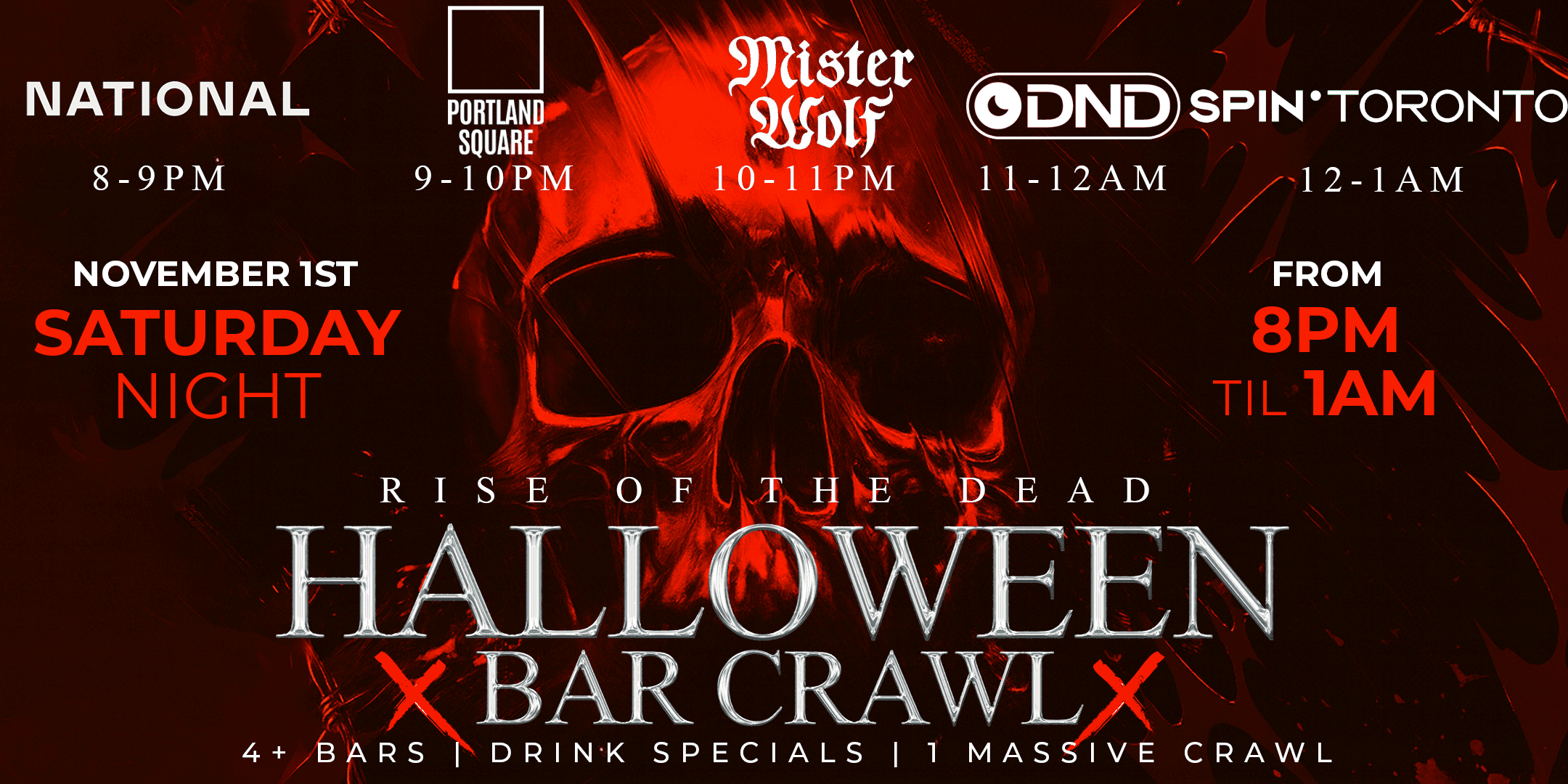
- Event Name: RISE OF THE DEAD TORONTO HALLOWEEN CRAWL | Saturday, November 1st
- Date: Saturday, Nov 1, 2025
- Time: 8:00 PM – 2:00 AM
- Venues: Petty Cash, Portland Square, Mister Wolf, DND, FUTURE Toronto
- Event Links:
- Primary Link: Eventbrite Link
- Alternate Link: torontohalloweencrawl.com
- Weather Note: This event involves multiple outdoor transitions, so please dress warmly (jacket, gloves, hat, and warm footwear).
Host Payment and Invoicing
- Invoice Submission: Prepare an invoice before the event. All hosts must submit an invoice, even if paid in cash.
- Invoice Instructions: Follow these steps.
- Payment Details: Use your email for e-transfer, or inform Murssal if you prefer an alternative email.
- Hours to Bill: Please bill for 5 hours worked from 7:30 PM to 12:30 AM using the provided invoice instructions.
Event Night Responsibilities
1. General Responsibilities
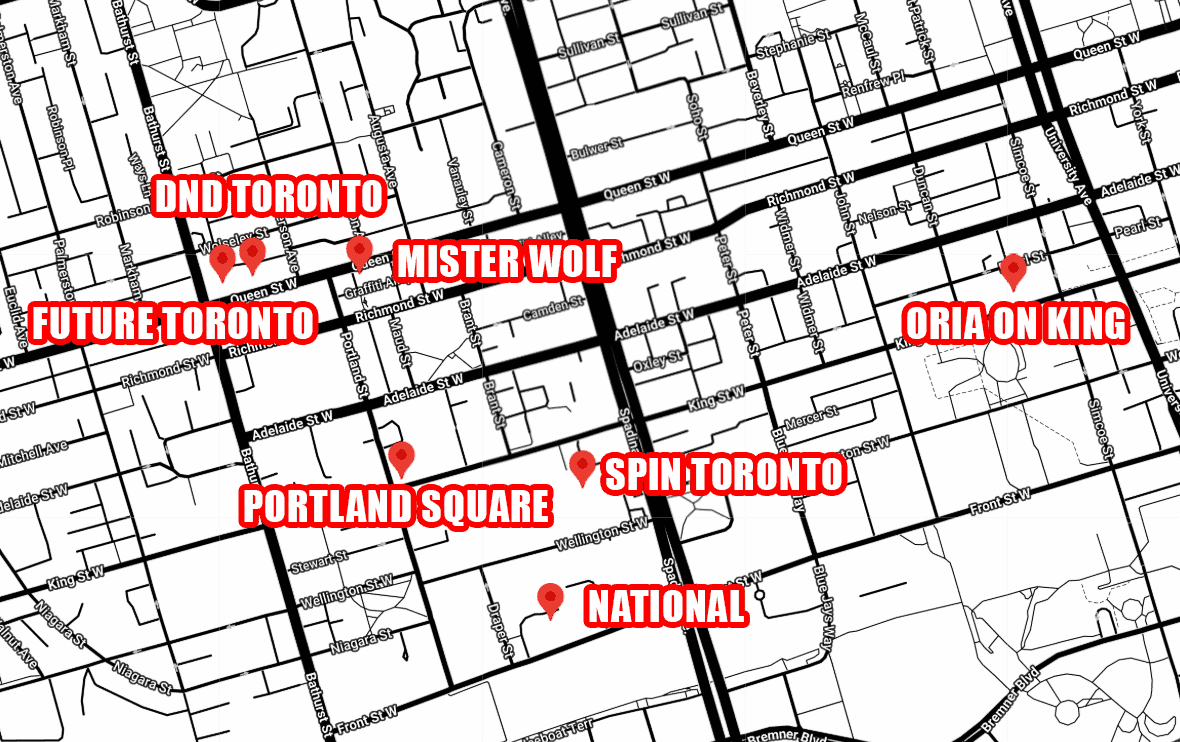
- Identification: You’ll receive a lanyard clearly. The lanyard also includes a QR code for ticket purchases and a map of the crawl for guests.
- Ticket Scanning with Eventbrite:
- Downloading the App: Download the Eventbrite Organizer App from the Apple App Store or Google Play Store.
- Using the App: Log in with your credentials. Once logged in, select the Crawl event and use the app’s scanning feature to validate tickets. For unscanned tickets, you can manually look up names in the system.
- Handling Issues: If a ticket doesn’t scan or a name isn’t listed, escalate the issue to Murssal.
- Selling Tickets:
- For guests without tickets, show them the QR code on your lanyard for online purchases.
- If guests can’t buy tickets online, direct them to MANAGING HOST for cash sales (pricing may vary through the night).
2. Venue Schedule and Duties
National Toronto
- Time: 8:00 PM – 9:00 PM
- 📍 486 Front St W, Toronto, ON M5V 0V2 (At the Well)
- Responsibilities:
- Arrive at 7:30 PM to set up and ensure your Eventbrite app is functioning.
- Scanning & Distribution: Scan tickets and place wristbands on guests at the entrance.
- Encouraging Next Venue: At 8:50 PM, guide guests toward Portland Square. Ensure they are aware of the address and encourage them to follow the QR code directions if needed.
- 1 host needs to stay at Petty Cash to direct people to the National in case they dont know.
Portland Square
- Time: 9:00 PM – 10:00 PM
- 📍 600 King St W, Toronto, ON M5V 1M6
- Responsibilities:
- Continue scanning tickets and providing wristbands for guests who missed Petty Cash.
- Transition to Mister Wolf: At 9:50 PM, remind guests to move to Mister Wolf and provide clear directions using the QR code. ONE HOST STAY AT PORTLAND SQUARE UNTIL 10:00PM to redirect/wristband people, then go to Mister Wolf to rejoin rest of hosts.
Mister Wolf
- Time: 10:00 PM – 11:00 PM
- 📍 567 Queen Street West, Toronto, ON M5V 2B6
- Responsibilities:
- Continue scanning tickets and wristband distribution until 11:00 PM.
- Final Reminder: At 10:50 PM, announce the next venue, DND Toronto, and ensure guests know wristbands will only be available there until 11:00 PM. ONE HOST STAY AT MISTER WOLF UNTIL 11:00PM TO REDIRECT PEOPLE OUTSIDE TO DND TORONTO, THEN REJOIN THE OTHER HOSTS AT DND TORONTO.
- If Mister wolf is at capacity send people to SPIN Toronto.
DND Toronto
- Time: 11:00 PM – 12:00 AM
- 📍 550 Queen St W, Toronto, ON M5V 2B5
- Responsibilities:
- Ensure all wristbands are distributed.
- IF DND is at capacity send people to portland square.
- Crowd Guidance: Confirm that all guests are moving toward SPIN Toronto at 11:50 PM.
- ONE HOST STAY AT DND TORONTO UNTIL 12:00 MIDNIGHT OUTSIDE TO REDIRECT PEOPLE TO SPIN (LAST STOP), AND GO TO SPIN afterrwards.
SPIN Toronto
- Time: 12:00 AM – 2:00 AM
- 📍 461 King St W Lower Level, Toronto, ON M5V 1K4
- Responsibilities:
- End of Shift: Stay until 12:30 AM to assist with any remaining questions and ensure all wristbands are distributed.
- If SPIN is at Capacity send people to Oria on King.
Handling Specific Scenarios
High-Volume Ticket Sales
- If crowds are large, split responsibilities with two hosts handling scanning and stamping, and one host focusing on wristbands.
Cash Payments
- Direct cash-paying guests to Murssal. Only they can handle cash transactions for tickets.
Ticket Scanning Issues
- If a ticket won’t scan, use the name search in the Eventbrite Organizer app. If the guest isn’t listed, escalate to Murssal.
Crowd Control and Venue Transitions
- Remind guests they must leave each venue when its time slot ends to move to the next location.
- DJs will assist by announcing venue transitions. Encourage guests to take a photo of the QR code with venue details or a photo of you displaying the google maps of the next venue.
Managing Guests Without Wristbands
- If guests arrive at later venues without wristbands, check for a stamp. Those without stamps must show a ticket for a stamp, or purchase a ticket to be scanned for a stamp. Direct them to Murssal if necessary.
Large Group Handling
- For large groups, split into designated roles: one for scanning and stamping, another for wristbands. Ensure clear lanes for guests with and without wristbands to maintain flow.
Policies and Disclaimers
- Ticket Validity: Tickets are valid only for specific time slots at designated venues. Late arrivals or incorrect venues are non-refundable.
- Venue Capacity: Entry is subject to each venue’s capacity. Guests may need to wait if a venue is full, and refunds will not be issued.
- Weather Considerations: The event will proceed rain or shine; guests should dress appropriately.
Refund Policy
- Reinforce that tickets are valid only for the crawl-specific venues and times. Guests can request refunds through Eventbrite if needed.
Rise Of The Dead Crawl Instructions